MATTHIJSSEN AI BILLING SOLUTIONS
CLIENT CASE STUDY | INVOICE AUTOMATION
Read by AI. Posted only when it can be proven.
How Matthijssen built AI-assisted accounts payable for QuickBooks Desktop that automates invoice entry without allowing uncertain data to quietly reach the ledger.
|
9 checks before any bill posts |
80–90 invoices in a typical working-day batch |
100% of posted bills read back and confirmed on file* |
|
The design rule A stop is always preferable to a plausible wrong number. If the system cannot prove an invoice is safe to post, it routes the item to a person with the reason attached. |
At a glance
|
Challenge |
Manual AP entry was repetitive, error-prone and difficult to prove after the fact. |
|
Approach |
AI proposes invoice data; deterministic rules, human review and read-back verification decide whether it is safe to post. |
|
Outcome |
The workflow is designed to stop on uncertainty, preserve a full verification record and automate routine entry into QuickBooks Desktop. |
*Based on the evaluation workflow described in the supplied case study.
01 / THE CHALLENGE
A day of typing the books already earned.
Reading an invoice was not the difficult part. Knowing when the reading could not be trusted was the real problem.
Manual accounts-payable entry does not scale gracefully. A bookkeeper opens each invoice, reads the vendor, total and dates, decides where it belongs, and retypes the data into accounting. Even at one to two minutes per invoice, a batch of 80–90 invoices can absorb most of a working day.
The cost is not only time. A transposed digit, duplicate bill, wrong account, or altered remit-to detail can create an error that looks completely normal after it has posted.
The case study also highlights a second problem: after the fact, many accounting workflows cannot prove that a historical entry was actually checked against its source document.
|
80–90 invoices in a working-day batch |
1–2 min typical manual entry per invoice |
Silent errors may look legitimate after posting |
Where manual entry breaks down
|
Risk |
What can happen |
Why it matters |
|
Transposition |
A correct-looking number is keyed incorrectly. |
The ledger accepts the error unless someone notices. |
|
Duplicate entry |
The same bill is entered twice by different people. |
Payment and reporting can both be wrong. |
|
Remit-to change |
Fraudulent payment details appear on an otherwise familiar invoice. |
A rushed review can miss a known fraud pattern. |
|
No audit proof |
The original invoice and the entered bill are not linked by verification evidence. |
Later review cannot prove what was checked. |
02 / THE APPROACH
Automate the reading. Never the decision.
The system treats AI output as a proposal. Deterministic rules, human review and read-back verification determine whether an invoice is allowed to reach QuickBooks Desktop.
Three principles
|
01 The model proposes. It never decides. Extracted values are evaluated by fixed, auditable rules instead of being trusted simply because the model sounds confident. |
02 Built to be interrupted. Anything unresolved is routed to a review queue with the reason attached, for a person to correct, approve or reject. |
03 Confirm the write. Every posted bill is immediately read back from the accounting system and the result is recorded against that line. |
The workflow
|
Split |
Straighten |
Read |
Check |
Review |
Post + verify |
|
Separate a feeder stack into individual invoices. |
Turn each page upright before reading. |
Extract invoice detail with AI. |
Run nine deterministic gates. |
Route uncertainty to a person. |
Write to QuickBooks and read the bill back. |
|
Why read-back matters A successful write only proves that the accounting system accepted the request. The workflow immediately reads the bill back and records whether the posted values match what was approved. |
THE NINE CHECKS
Every invoice must clear nine gates before it posts.
Any single failure sends the invoice to review instead of to the ledger.
|
01 Extraction confidence Poor scan quality, unfamiliar layout or handwriting makes the read unsafe. |
02 Vendor match score Unknown vendor or a name too different from the vendor list. |
|
03 Document type Receipt, statement or credit memo mistaken for an unpaid invoice. |
04 Invoice date Date cannot be read or falls outside a believable window. |
|
05 Missing or zero total No usable amount means there is nothing meaningful to post. |
06 Arithmetic cross-check Subtotal and tax must reconcile to the total, with bounded allowance for credits or surcharges. |
|
07 Exact duplicate Same vendor and invoice number already posted. |
08 Near duplicate Same vendor and amount with a nearby date under another reference number. |
|
09 Remit-to mismatch Address or phone differs from the vendor on file, a known invoice-fraud pattern. |
|
|
Human control is intentional The review queue is not a fallback for a failed automation design. It is the control point for cases where judgment, correction or exception handling is required. |
FROM REAL DOCUMENTS
What real invoices taught the system.
The strongest failures did not appear in clean sample documents. They appeared in the messy ways real offices scan, store and receive invoices.
|
Batch scans |
What failed: A feeder produced one PDF containing many invoices. Fourteen invoices were silently lost before the workflow was changed to split the stack first. What changed: Now the system determines how many invoices are present before extracting anything. Uncertain pages become separate review items. |
|
Orientation |
What failed: Sideways scans produced wrong figures even while the AI reported high confidence. What changed: Every page is turned upright before reading; the code handles the rotation logic instead of asking the model to reason about degrees. |
|
Long invoices |
What failed: A four-page distributor invoice with 26 line items exceeded the model output limit and surfaced as a cryptic parse error. What changed: Truncation is now detected and retried in a reduced form instead of appearing as an unexplained failure. |
|
Legitimate credits |
What failed: A correct invoice containing keg credits failed a simple arithmetic check. What changed: The check now understands discounts, credits, deposits and surcharges, but within bounded limits so real misreads are not explained away. |
03 / THE IMPACT
Safe enough to leave running on real books.
The clearest proof came from a single invoice scanned sideways and then read again upright. The model sounded confident both times. The values were not the same.
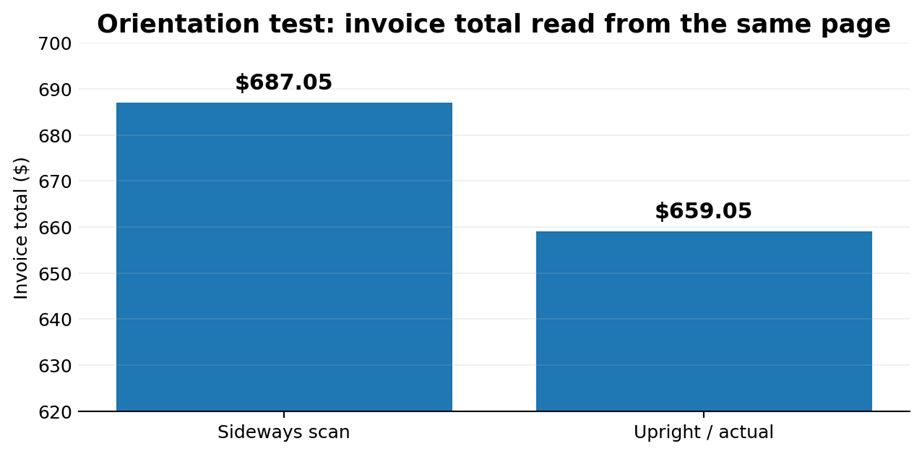
Sideways: $687.05 | Upright / actual: $659.05 | Difference: $28.00
|
Field |
Sideways read |
Upright / actual |
|
Invoice total |
$687.05 |
$659.05 |
|
Invoice number |
19326197 |
19398197 |
|
Invoice date |
26 Jan 2009 |
04 Sep 2026 |
|
9 checks before posting |
14 invoices a feeder batch silently dropped before the fix |
100% posted bills read back and confirmed on file* |
SECURE BY DESIGN
Local by design. Human where it matters.
The workflow keeps operational control close to the people responsible for the books, while using AI only for the invoice-reading step.
|
Local records The vendor list, review queue, settings and activity history stay in one local database file. The supplied case study states that nothing is hosted; only the invoice image is sent to the AI provider selected by the operator, using a key the operator supplies and controls. |
Operator-controlled connection The system waits for the operator to open the accounting software, connects to it, and steps back when it closes. Backup and restore are built in, and licensing can be verified offline. |
|
The human control point Everything the system cannot resolve reaches a person with the reason attached. Review, correction and exception handling remain with the team responsible for accuracy. |
|
What could your team do with more time? Bring your next billing or productivity challenge to Matthijssen. We design practical automation around real processes, real systems and the people responsible for the final decision. TALK TO AN EXPERT |
QuickBooks is a registered trademark of Intuit Inc. This case study describes an independent, unaffiliated integration.